Restore something from the Recycle Bin
Updated 13 October 2026
When you delete a record such as a booking, contact or task, it goes to the Recycle Bin for 30 days. You can restore it from there until then.
Steps
Go to Settings → System → Recycle Bin.
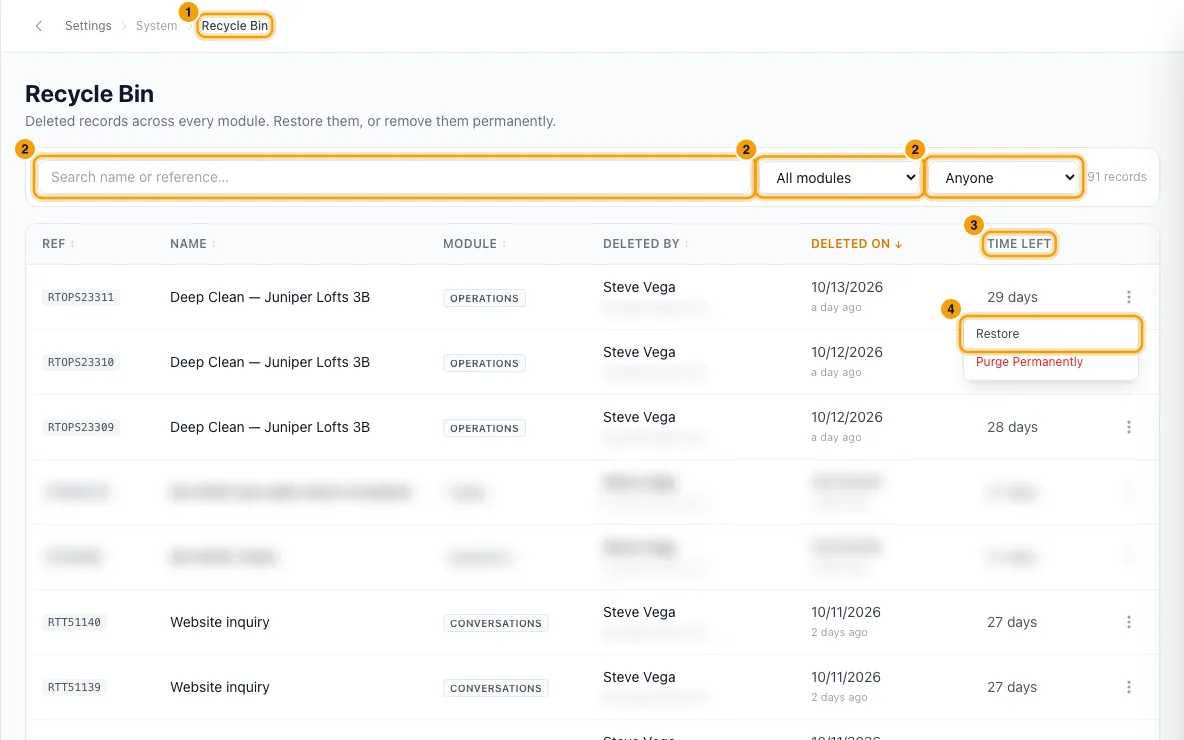
Find the record. Type in Search name or reference…, pick a module under All modules, or pick a person under Anyone to see what they deleted. Click a column header to sort.
Check Time left to see how long until it is removed for good.
Open the menu at the end of the row and click Restore. The record goes back to where it was and leaves the list.
Good to know
- What goes here: deleted Contacts, Properties, Bookings, Inquiries, Quotes, Tasks, Operations, Users, Conversations, Expenses, Receipts, Saved Reports and Incidents. The module list only shows modules that have something in the bin, with a count.
- What doesn't: settings items such as tags, sources and custom fields are deleted straight away. (Payment methods are archived instead, and can be restored on their own page.) An erased person (a data request) never comes here and can't be restored.
- How long: 30 days from when it was deleted. Time left turns orange in the last 3 days and shows Due now after that. A nightly clean-up then deletes the record and its files for good. It removes up to 200 records per module each night, so a big backlog clears over several nights.
- A record that other records still point to (for example a contact with payments) can't be removed for good. It stays in the bin until those links are gone.
- A deleted personal task only shows to the person who created it and the person it was assigned to. Other people, admins included, don't see it in the bin or in its count.
- Deleted by shows who deleted it. Unknown means no person was recorded — usually because it was deleted before Rentibly started recording who deletes that kind of record.
- Expenses the system keeps in step are not listed. An expense that mirrors a booking charge, a PM commission, a transaction fee, an operation or a recurring expense is replaced automatically whenever its source changes. Those replaced copies don't come here and can't be restored — restoring one would count the same cost twice. Change the booking or operation instead. Only expenses someone entered by hand show in the bin.
- Restore only brings the record back. It doesn't send emails or run automations.
- Restoring an operation that was billed to the owner posts its owner expense again, worked out from the operation as it is now. An operation that never had an owner expense stays without one.
- Merged contacts: when you merge two contacts, the one merged away shows here for 30 days. To reverse a merge, use Undo on the Merge Log instead. Restore refuses a merged-away contact and points you to the Merge Log, because restoring it alone would bring back an empty record while its bookings and other records stay with the contact it was merged into. See "Find and merge duplicate contacts".
- Purge Permanently removes a record and its files right away. It can't be undone. Only the account owner can do it, and only the account owner sees the button.
- If the bin can't load, the page says so. Your deleted records are still there and nothing is removed while that happens.
- You need the Settings permission set to Access to open the Recycle Bin and restore records.
Rentibly AI can help
- Rentibly AI can't restore or purge records yet. Use this page.
Still stuck?
Open Support from your profile menu in Rentibly, or email hello@rentibly.com — we answer fast.