Choose who owns a booking inquiry
Updated 13 October 2026
Decide whether a guest's booking inquiries are assigned automatically to the agent working the guest's conversation, or only by a person.
Steps
Open Settings → Users & Access → Inquiry Routing.
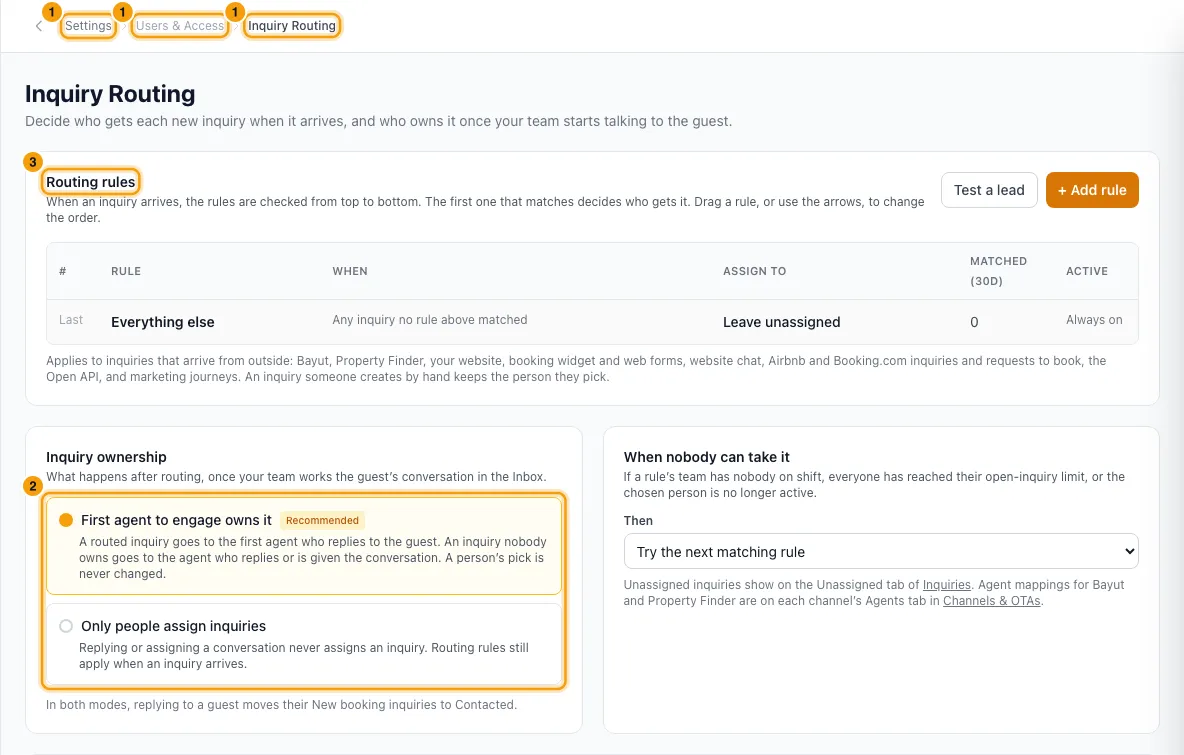
Under Inquiry ownership, click one option. It saves straight away.
- First agent to engage owns it (the default).
- Only people assign inquiries.
To change who gets an inquiry when it arrives, use Routing rules on the same page. See "Send new inquiries to the right person (Inquiry Routing)".
Good to know
- First agent to engage owns it:
- When an agent sends a reply to a guest in the Inbox, the guest's open booking inquiries that nobody owns are assigned to that agent.
- When a conversation is assigned to an agent (Assign, Take ownership, or Rentibly AI), the guest's open booking inquiries move to that agent too.
- An inquiry a routing rule assigned when it arrived goes to the first agent who replies.
- An inquiry that a person assigned (in the inquiry, with Rentibly AI, in bulk, or by creating a quote) is never changed automatically.
- If another agent already took the inquiry by replying, a second agent replying does not take it. Assigning the conversation to someone else does move it.
- Only people assign inquiries: replying or assigning a conversation never assigns an inquiry. Routing rules still apply when an inquiry arrives.
- In both modes, a reply moves the guest's New booking inquiries to Contacted and sets their last-contacted time.
- It applies to every open booking inquiry of that guest, not just one. A guest who asked about three listings has three inquiries, and the agent talking to them gets all three.
- Owner inquiries, and inquiries that are Booked, Lost or Junk, are not changed.
- If the conversation is not linked to an inquiry yet, it is linked to the guest's newest open booking inquiry.
- Every automatic change shows on the inquiry's timeline.
- No one gets an extra notification for an inquiry assigned this way. The agent is already notified about the conversation.
- A platform admin working in your workspace never becomes the owner.
- Changing this setting needs access to Settings.
Rentibly AI can help
- It can assign an inquiry to someone.
- It can assign a conversation. In First agent to engage owns it mode, the guest's open booking inquiries follow it.
- It can switch the ownership mode. You confirm the change.
Still stuck?
Open Support from your profile menu in Rentibly, or email hello@rentibly.com — we answer fast.