Let owners book their own stays in the owner portal
Updated 13 October 2026
An owner can book a stay at their own property from the owner portal, then change or cancel it. You choose which owners can do this.
Steps
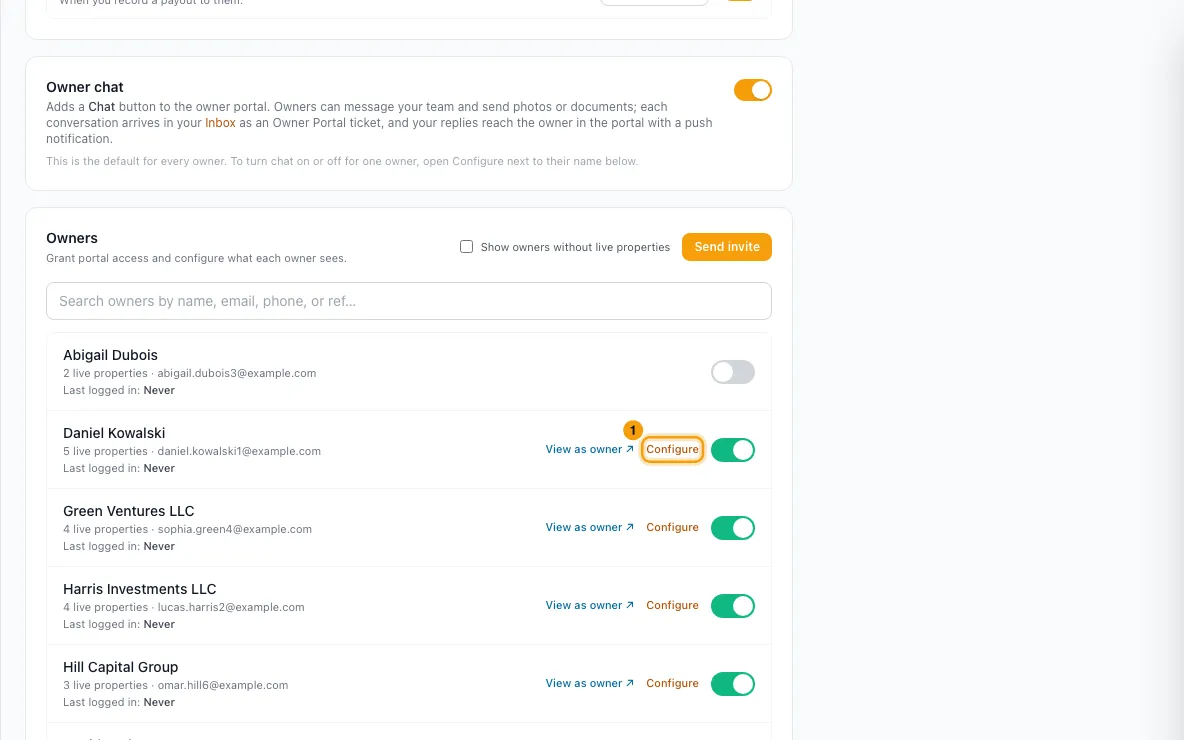
Go to Settings → Owners → Owner Portal. Under Owners, find the owner and click Configure.
Open the Owner Stays tab.
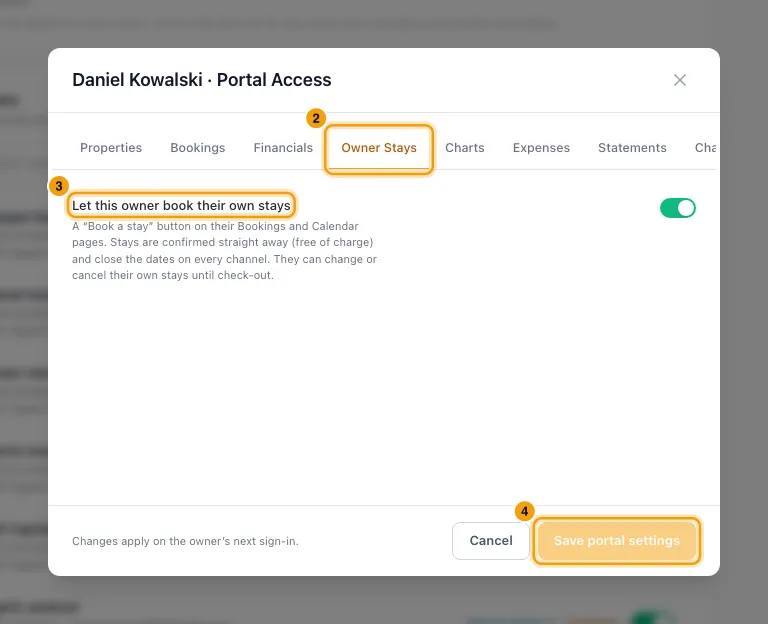
Turn Let this owner book their own stays on or off.
Click Save portal settings.
What the owner then sees in their portal:
A + Book a stay button on their Bookings page and their Calendar page. In the calendar's Month view they can also click an open day to start a stay from it.
In Book a stay they pick the Property, then their dates on the calendar under Dates: first the check-in day, then the check-out day. Nights that aren't available are greyed out and can't be picked.
They set Guests, write a Note for your property manager (required), and click Book stay.
To change or cancel it, they open the stay and click Change or cancel. They can pick new dates on the same calendar (their stay's own nights count as free) or change the guests, then click Save changes. Or they click Cancel this stay, then Yes, cancel stay.
Good to know
- The switch is on by default. An owner nobody has configured can book stays. Turn it off for any owner who shouldn't.
- Confirmed straight away. There is no approval step. The stay is an owner-stay booking, just like Bookings → + New Owner Stay:
- it gets an owner-stay reference (RTOB…)
- it is free of charge
- it closes the dates on every connected channel
- it sends the owner-stay alerts set up under Owner notifications
- you can add a charge to it afterwards
- Held dates can't be booked. If a quote holds the dates for a guest, the owner can't book or move a stay onto them. A hold counts while its quote is a draft, sent or viewed and not expired, or accepted and not yet a booking. Owners see these days as Held on their portal calendars. Nothing happens to the quote.
- Open quotes without a hold are revoked. If one of your open quotes covers the dates but doesn't hold them, the owner's stay is booked and the quote is revoked, exactly as when your team books over it.
- The owner's note is the stay's Reason. On your Calendar, hover over the stay's bar to see it under REASON. It stays when the dates change. The owner can't edit it after booking. The stay's internal notes say "Booked by the owner in the Owner Portal."
- The date calendar shows a year ahead. A night is unavailable if it has a booking, an owner stay, a block or a quote hold. Checking out on the day another stay checks in is allowed. Owners never see who or what is on an unavailable night.
- What owners can book:
- only properties they actively own that you haven't hidden from their portal
- dates from today on, up to 365 nights
- no more guests than the property sleeps
- dates already taken by a booking, an owner stay or a block are refused
- Changing and cancelling:
- An owner can change or cancel any owner stay booked under their name, including one your team made, until its check-out day.
- Once the stay has started, only the check-out date can change.
- A date change keeps the stay's price.
- Cancelling changes nothing on the stay's charges or payments; you settle those yourself.
- Owners always see their own stays on their Bookings page, even with Owner stays off on the Bookings tab. That switch still hides owner stays booked under another owner.
- The Owner stays pill on the owner's Bookings page, after All, Upcoming, Staying, Past and Cancelled, lists only owner stays, by the same rule. The tiles above it then count owner stays only.
- During View as owner, the buttons are hidden and nothing can be booked.
Rentibly AI can help
- Rentibly AI can't change this setting. It can explain what it does.
Still stuck?
Open Support from your profile menu in Rentibly, or email hello@rentibly.com — we answer fast.