Reconcile channel payouts
Updated 13 October 2026
When a guest pays the channel (Airbnb, for example), the channel owes you that money, less its commission. Channel Payouts lists what each channel still owes, one row per reservation, so you can tick payouts off against your bank statement as they arrive.
Steps
In the sidebar, open Finance → Channel Payouts.
Check the tile for each channel: Awaiting payout is what it still owes you. Click a tile to show only that channel; click it again to show all.
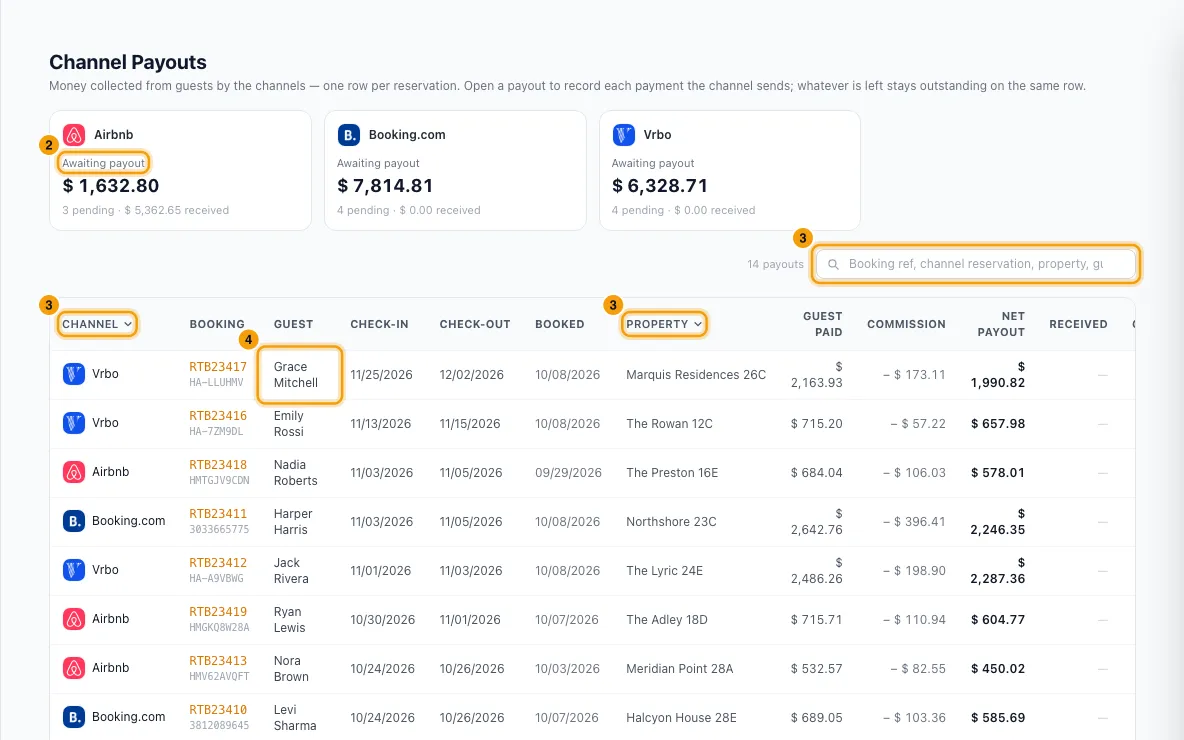
To find a payout, search by booking ref, channel reservation, property or guest. You can also filter from the Channel, Property, Status, Expected on and Last received column headings.
Click the reservation's row to open Channel payout.
Click + Record a payment received.
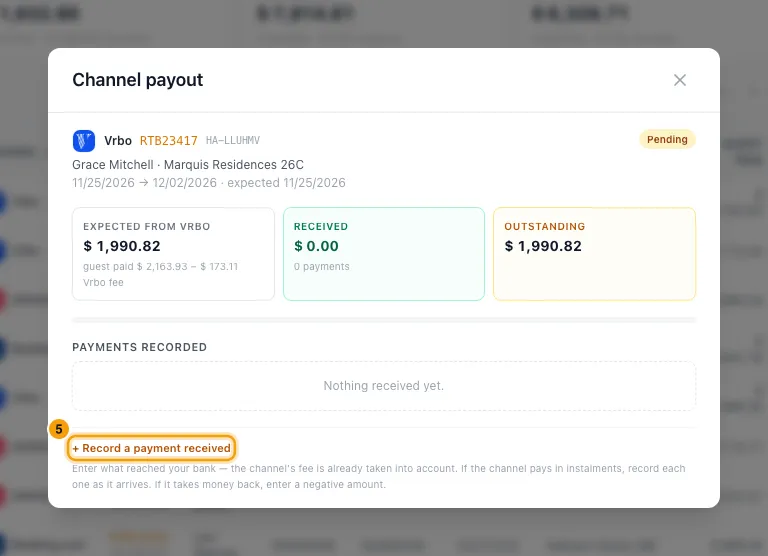
Enter the Amount received: what reached your bank, after the channel's fee. Click Full amount if the whole payout arrived.
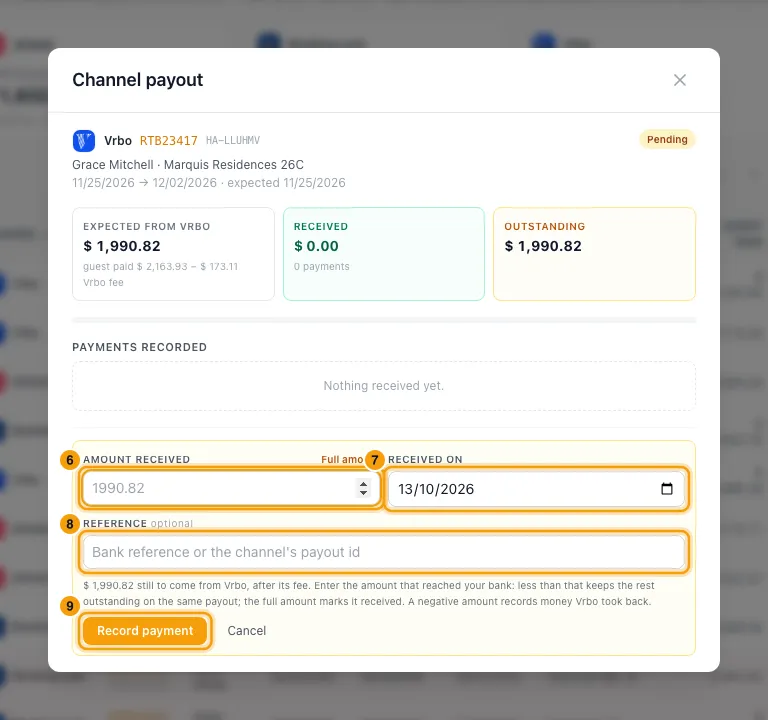
Set Received on to the day the money landed.
If you like, add a Reference (the bank reference or the channel's payout ID).
Click Record payment.
If the channel paid more than it still owes, Rentibly asks you to check. This happens when the channel changes a booking after paying it. If that's what happened, click Yes, record (it shows the amount). If not, click Change the amount.
When the channel takes that extra back from a later payout, open this reservation again and click + Record a payment received. Click Taken back (or type the amount as a negative number, like -763), set Received on to the day of that later payout, then click Record money taken back.
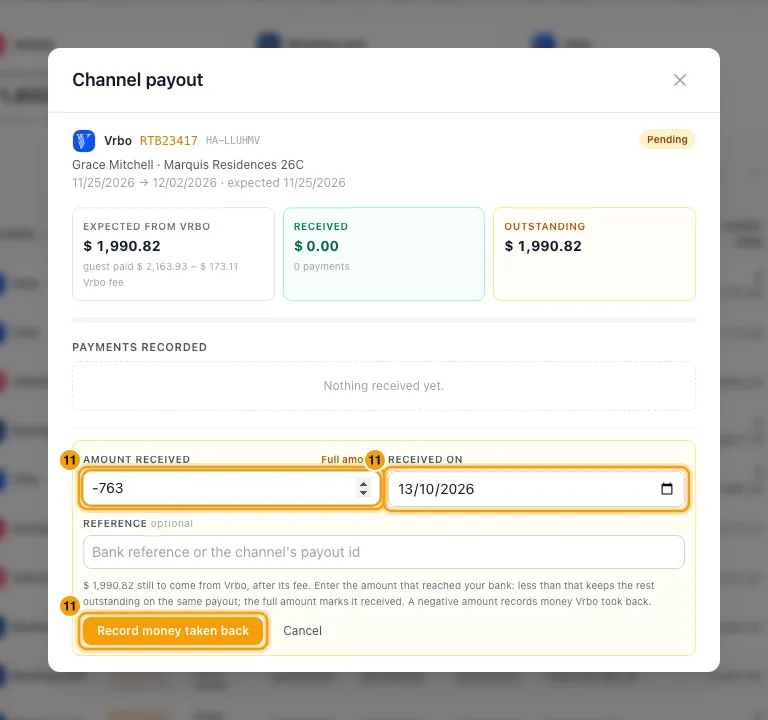
Record the later payout itself on its own reservation, in full, as usual.
Good to know
- What appears here: bookings where the guest paid the channel. Rentibly adds them automatically when the booking arrives from a connected channel. Bookings paid with a channel virtual card, or charged by you, are not here.
- Guest paid is the guest's total. Commission is the channel's fee. Net payout is what the channel sends you. Received plus Outstanding adds up to Net payout, unless the channel paid too much.
- Status: Pending means nothing has arrived yet, Partially received means some has, and Received means all of it has. Owed back means the channel paid more than the booking is now worth and hasn't taken the difference back yet. Overdue means money is still outstanding after check-in on a booking that isn't cancelled. Overdue amounts show in red.
- Expected on is the check-in date, because channels pay around check-in. Last received stays blank until you record money arriving.
- A channel can pay a long stay in instalments. Record each one as it arrives: anything less than the full amount keeps the rest outstanding on the same row.
- When a channel changes a booking after paying it. Say Airbnb paid 6,865.72, then shortened the stay so the booking is now worth 6,102.72. Record the full 6,865.72 and confirm it. The 763.00 extra is listed under Payments recorded as paid extra, the Outstanding column shows 763.00 owed back, and the window shows Owed back to Airbnb. When Airbnb deducts it from a later payout, record -763 on this reservation. It's listed as Taken back and the payout goes back to Received.
- You can't take back more than has been received on that reservation. If the channel took back more, the rest belongs to another reservation.
- Money paid extra and money taken back are recorded at the bank amount. The channel's fee isn't applied to them, because the booking's fee is already right.
- The channel tile shows how much is owed back, and on how many bookings. Filter Status by Owed back to see them.
- Every payment you record is listed under Payments recorded in the Channel payout window. To fix a wrong amount, date or reference, click it there, then Edit. In that window the amount is the part of the guest's payment it covers, before the channel's fee.
- Recording a payment doesn't email the guest. The booking's balance doesn't change either: the guest already paid the channel. The exception is money paid extra: until the channel takes it back, the booking shows that amount as overpaid. Owner payouts don't change, because owners are never paid more than the booking earned.
- Each payment you record is dated with its Received on date, and owner statements see it with that date. Under Settings → Owners → Owner Defaults → Channel-collected money, When owners get paid decides whether owners on the cash basis are paid When expected or only When received (after you record the payout here).
- How you track it in the same section decides how new channel bookings are recorded. With Reconcile in Channel Payouts (the default), they wait here as pending. With Record on the booking, they are marked received as soon as the booking arrives, so there is nothing to record. The setting only affects new bookings.
- If the channel lowers a booking's total, the outstanding amount goes down with it. If it lowers it below what you already received, the difference shows as Refunded under Payments recorded.
- A payout you record by hand on a booking (payment method Channel Payout) also shows here, already received.
- You need the Finance permission at View to open this page and at Edit to record a payment. Correcting a recorded payment (clicking it under Payments recorded) needs Bookings at Edit. Without these, the window shows the payout but not the controls.
Rentibly AI can help
- Rentibly AI can't list or record channel payouts yet.
Still stuck?
Open Support from your profile menu in Rentibly, or email hello@rentibly.com — we answer fast.