Clean spam, marketing and newsletters out of the Inbox
Updated 13 October 2026
Close marketing emails, newsletters and other junk as spam so the Inbox only shows real guest, owner and vendor conversations. You can block the sender at the same time, so their next message never reaches the Inbox.
Steps
Click Inbox in the sidebar and open the conversation.
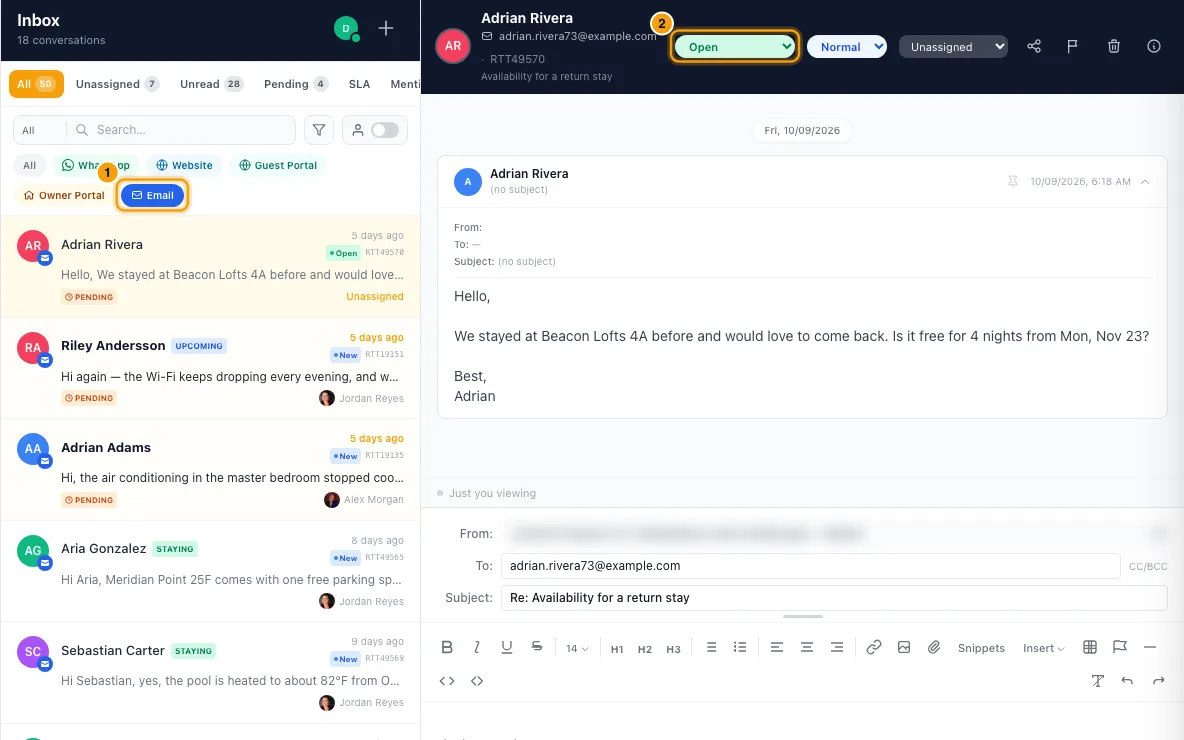
Set its status to Closed in the conversation header (or on the Ticket tab of the details pane). The Close Ticket window opens.
Choose Spam ("Close this ticket as spam / phishing / junk").
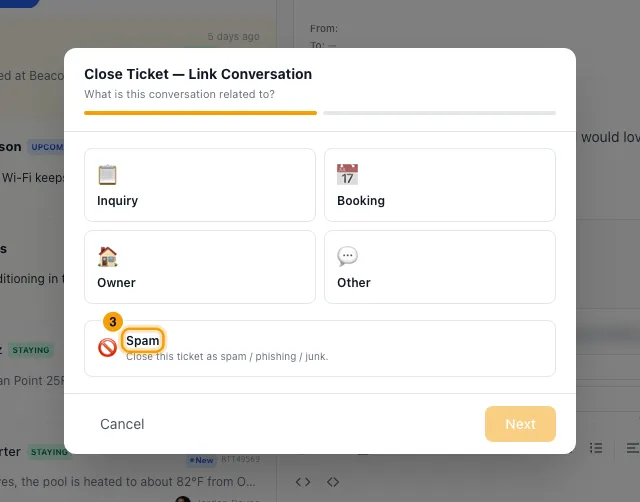
If a Reason list shows, you can pick one.
To stop future messages from this sender, tick Block future messages from. Leave it unticked to close without blocking.
Click Mark as Spam, Block & Close, or Mark as Spam & Close when you're not blocking.
With Rentibly AI, for many at once
- Ask Rentibly AI, for example: "Scan my open conversations and close the marketing emails and newsletters as spam."
- It reads each conversation's sender, subject and first message and lists the ones it thinks are junk.
- Check the card. It lists every conversation it will close, and anything it skipped and why.
- Tick Block next to each sender you want blocked. Leave a box empty to close without blocking.
- Click Confirm.
Good to know
- Closing as spam never deletes anything. The conversation stays under Closed, with a Ticket closed as spam banner, and you can reopen it.
- Closing as spam leaves the sender's open inquiries and quotes as they are.
- In the Close Ticket window, the sender's contact is marked as spam and "do not contact" only when you tick Block future messages from. When Rentibly AI closes a conversation as spam, a known sender's contact is always marked spam and "do not contact", blocked or not.
- Only email and WhatsApp senders can be blocked. Airbnb, Booking.com, Vrbo and website conversations can be closed as spam but not blocked.
- A blocked sender's new messages are dropped, and your team can't reply to them. They are never told. On WhatsApp, Rentibly also tries to block them on WhatsApp itself, which only works if they messaged you in the last 24 hours.
- If the block can't be placed, the conversation still closes and a message tells you why, for example when there is no phone number or email to block.
- To see or undo blocks, go to Settings → Communication → Blocks & Reports. See Review blocked senders and message reports.
- An email shows a Likely spam banner when its inbox account has Auto-detect suspicious email turned on (Settings → Email → Inbox accounts, then open the account) and the email scores high on sender checks. Nothing is hidden or closed for you.
- Rentibly AI only sees the conversations your Inbox shows you. It never closes a conversation linked to a booking or inquiry, or one whose sender has bookings, inquiries or quotes or is a known owner or vendor. Those show as skipped.
- One Rentibly AI card closes up to 100 conversations.
- In apps that don't show the Block boxes, Rentibly AI closes conversations without blocking anyone.
- You need the Inbox permission.
Rentibly AI can help
- It can scan up to 200 conversations at once and pick out the junk, then close them as spam and block the senders you tick.
Still stuck?
Open Support from your profile menu in Rentibly, or email hello@rentibly.com — we answer fast.