Send an announcement to a group of guests
Updated 12 October 2026
Tell every guest who is staying now, arriving or leaving about something, such as pool maintenance or a water cut. Each guest gets it in a conversation you already have with them: their Airbnb, Booking.com or Vrbo thread, their WhatsApp, or their email.
Steps
Announcements to many guests at once are sent with Rentibly AI. To message one guest, reply in their conversation in the Inbox.
Ask Rentibly AI, for example: "Tell all guests staying in Downtown Dubai that the pool is closed tomorrow from 9 to 1."
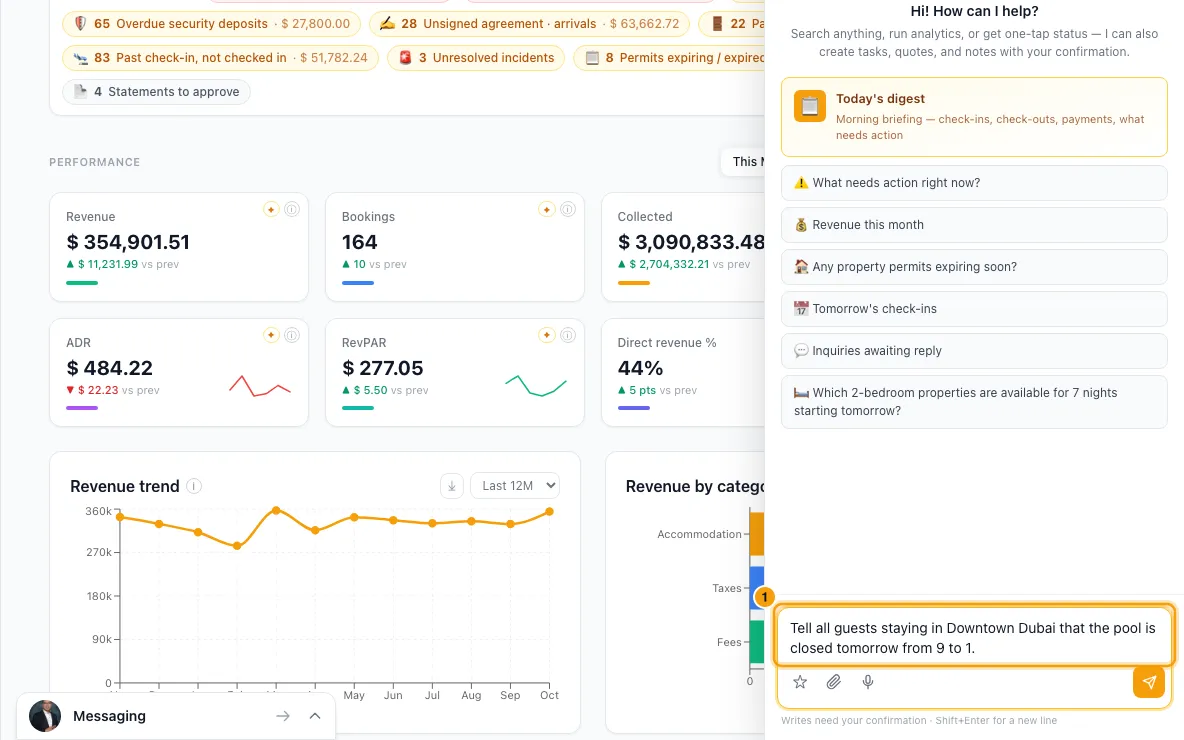
Say who should get it. By default it's guests staying now. You can ask for guests arriving or departing between two dates instead, and narrow it to an area, a building, some properties or a booking channel.
Rentibly AI drafts the message. It can fill in each guest's details with {first_name}, {guest_name}, {property}, {check_in} and {check_out}.
Check the card. It shows how many guests match, how many can be reached and on which channels, the message, an example for one guest, and anyone who can't be reached.
Under Recipients, each guest has a channel already chosen in Send via. Change it, or choose Don't send to leave that guest out.
If some WhatsApp guests haven't written in the last 24 hours, the card offers approved templates for them. Pick one under Use, or choose No template — skip them.
Click Confirm. The messages go out and appear in each guest's conversation in the Inbox. Rentibly AI then tells you who it was sent to, and who was skipped or failed and why.
Good to know
- Messages can't be unsent. Check the example on the card first.
- The channel chosen for each guest is their booking's marketplace thread first, then WhatsApp, then email. If a marketplace booking has no thread yet, Rentibly AI opens one; opening a thread sends nothing by itself.
- Only existing conversations are used. A guest with no WhatsApp, email or marketplace conversation is listed as not reachable. Reach them from the Inbox. Rentibly AI only uses conversations you can see in your own Inbox.
- Marketplace threads don't allow phone numbers, email addresses or outside links. The card warns you if the message has any; Airbnb or Booking.com may hide or refuse it.
- WhatsApp: a guest who hasn't written in the last 24 hours can only get an approved template. Without one, they're skipped.
- Who counts as a guest: cancelled and no-show bookings, inquiries and owner stays are left out. "Staying now" means checked in on or before today, leaving after today, and not yet checked out.
- Dates: arriving or departing guests default to today through 7 days from today.
- Limits: up to 100 guests per card, and up to 2,000 characters. For more guests, narrow the group by area, building, property or dates.
- In the mobile apps, confirming sends on the channel shown for each guest, with no template. Use the Hub to change channels or pick a template.
- For marketing messages to past or future guests, see "Send a marketing campaign by email or WhatsApp".
- You need the Inbox permission to send.
Rentibly AI can help
- builds the card and sends the announcement once you confirm. To offer WhatsApp templates, it first checks your approved ones.
Still stuck?
Open Support from your profile menu in Rentibly, or email hello@rentibly.com — we answer fast.