Set up a notification rule (e.g. email the guest before check-in)
Updated 13 October 2026
A notification rule sends a message on its own: when something happens (an event), or at a set time before or after a date. It can email or WhatsApp a guest or owner, post in the guest's Airbnb, Booking.com or Vrbo thread, or alert your team in-app and by push. A common example is emailing every guest 3 days before check-in.
Steps
Click your name at the bottom of the sidebar, then Settings. Under Communication, open Notifications and choose the Rules tab.
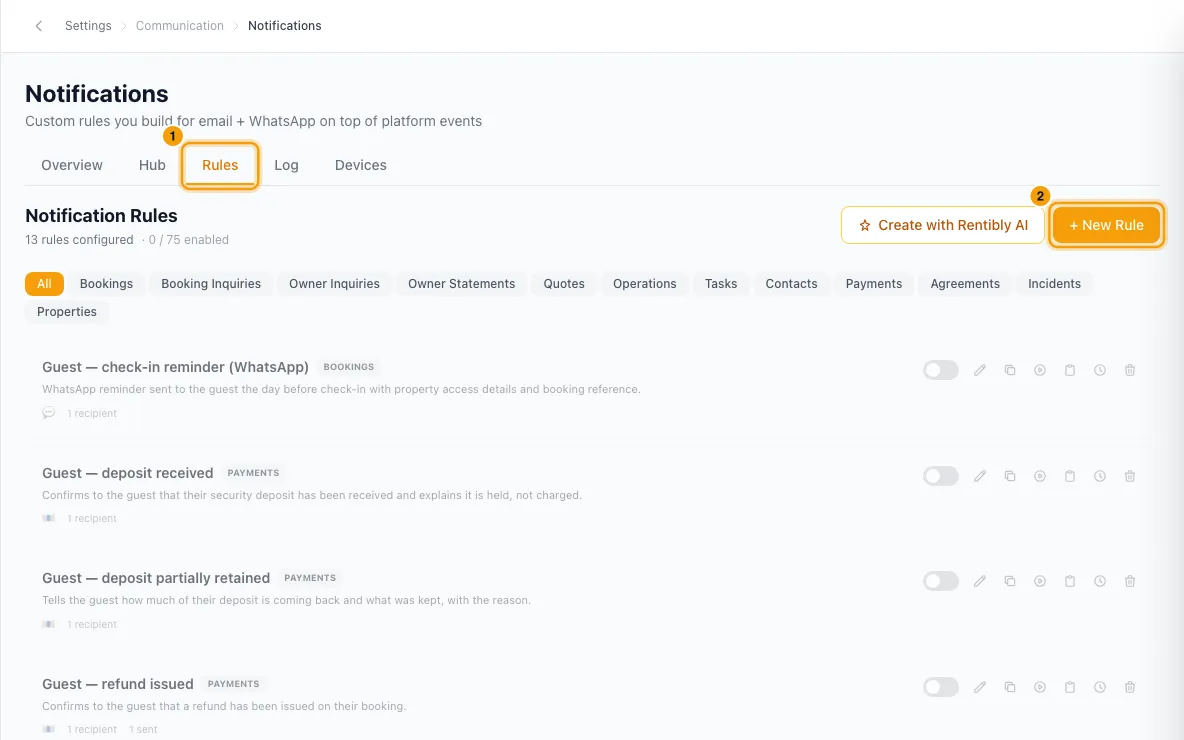
Click + New Rule.
What: enter a Rule Name and pick the Module, for example Bookings.
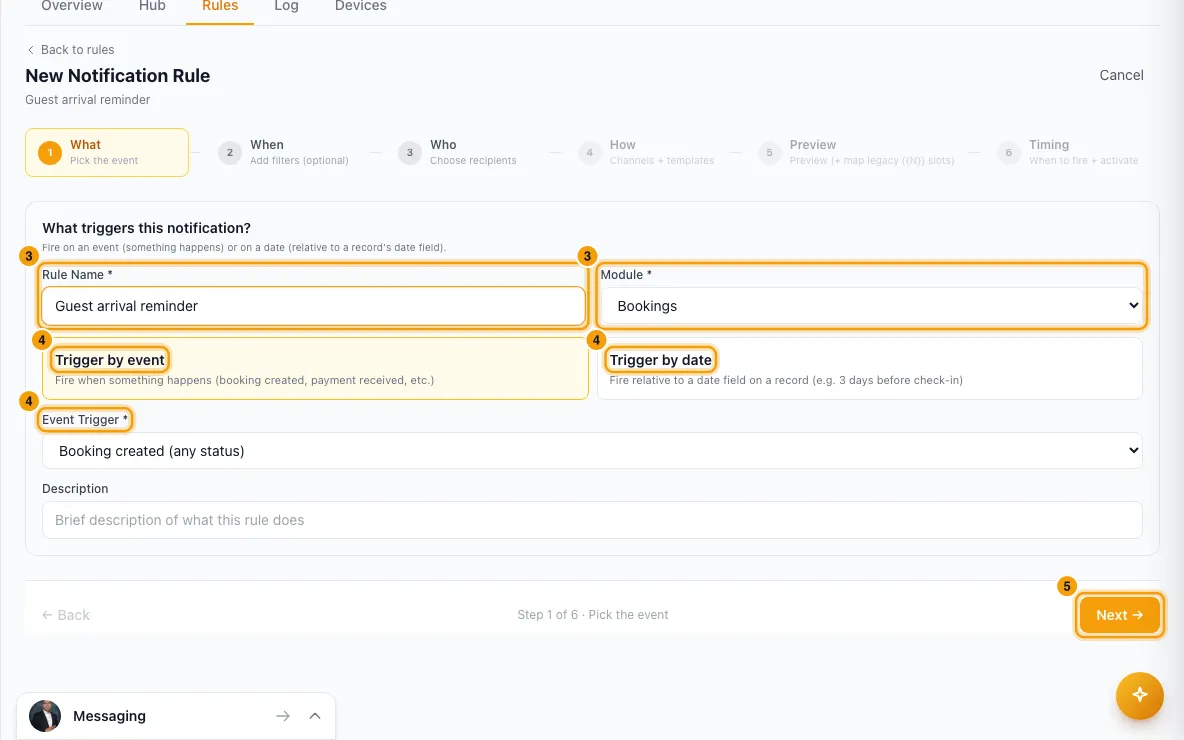
Choose how it starts:
- Trigger by event, then pick the Event Trigger, for example Booking created (any status).
- Or Trigger by date, then pick Which date? (for example Check-in Date), When to send (Before, After or On the day of), How many, Days or hours, and the Time of day.
Click Next →.
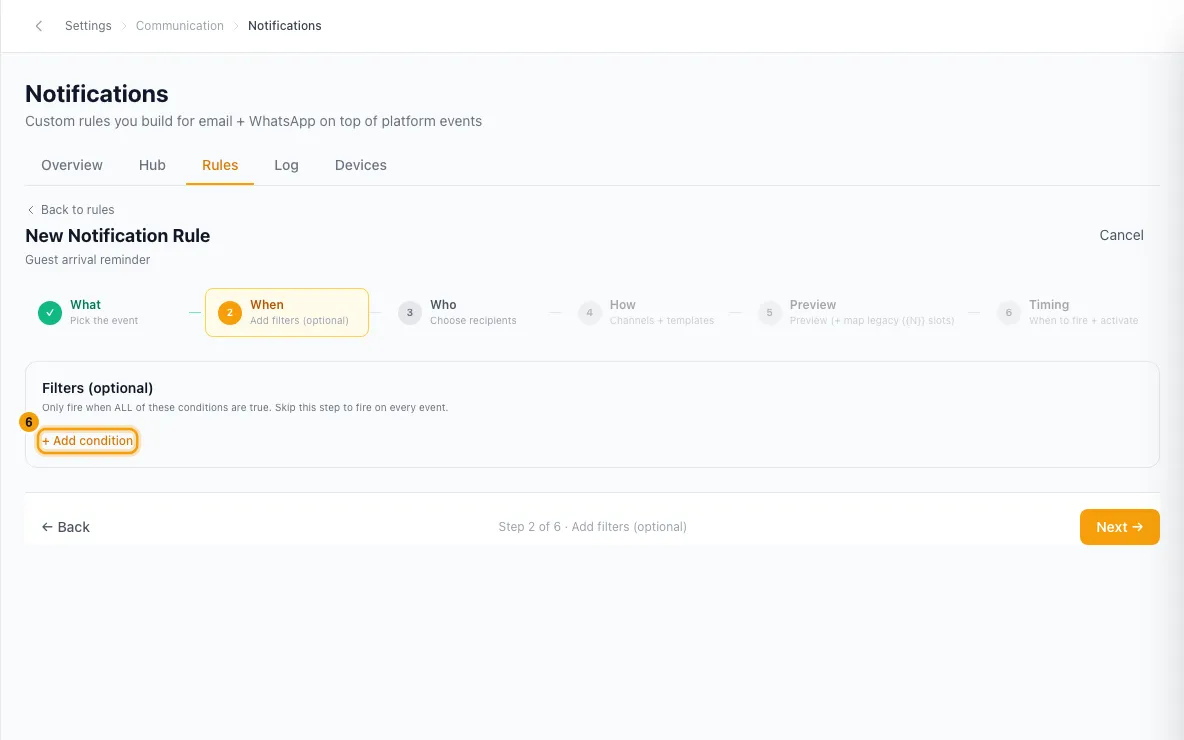
When: click + Add condition to send only for some records, for example only one property or one booking source. Skip this step to send for every record.
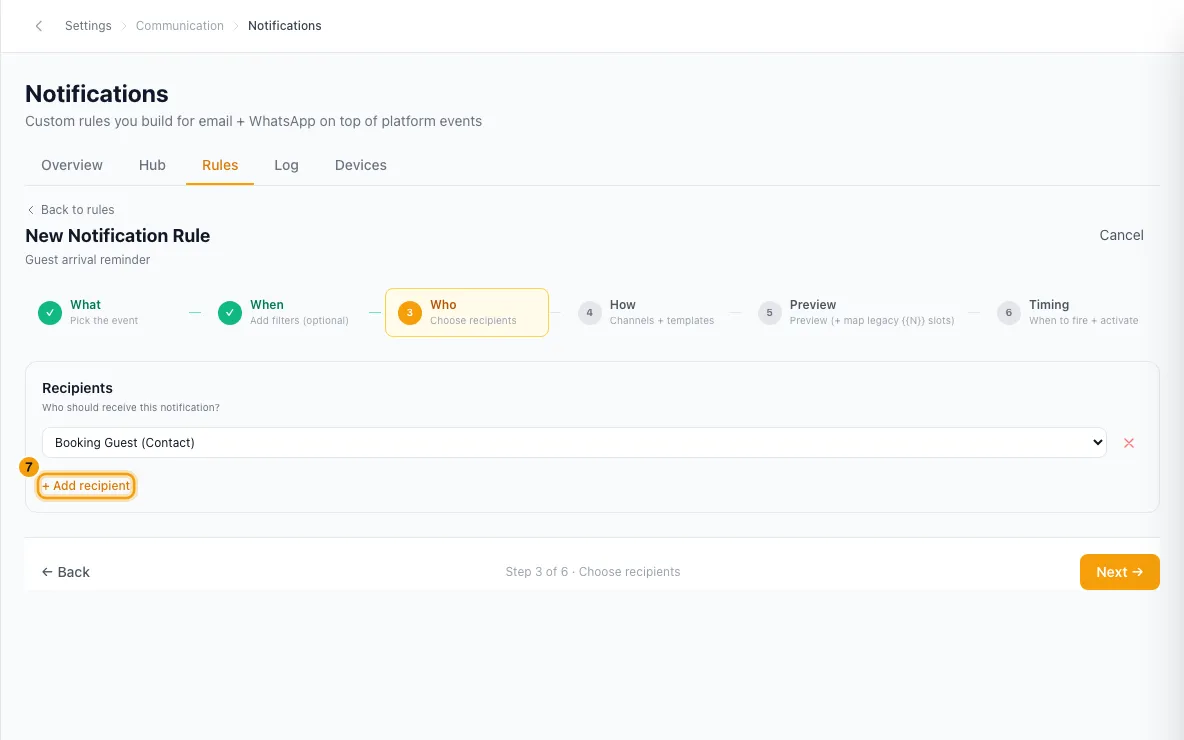
Who: click + Add recipient and pick from the list, for example Booking Guest (Contact). Custom Email sends to an address you type.
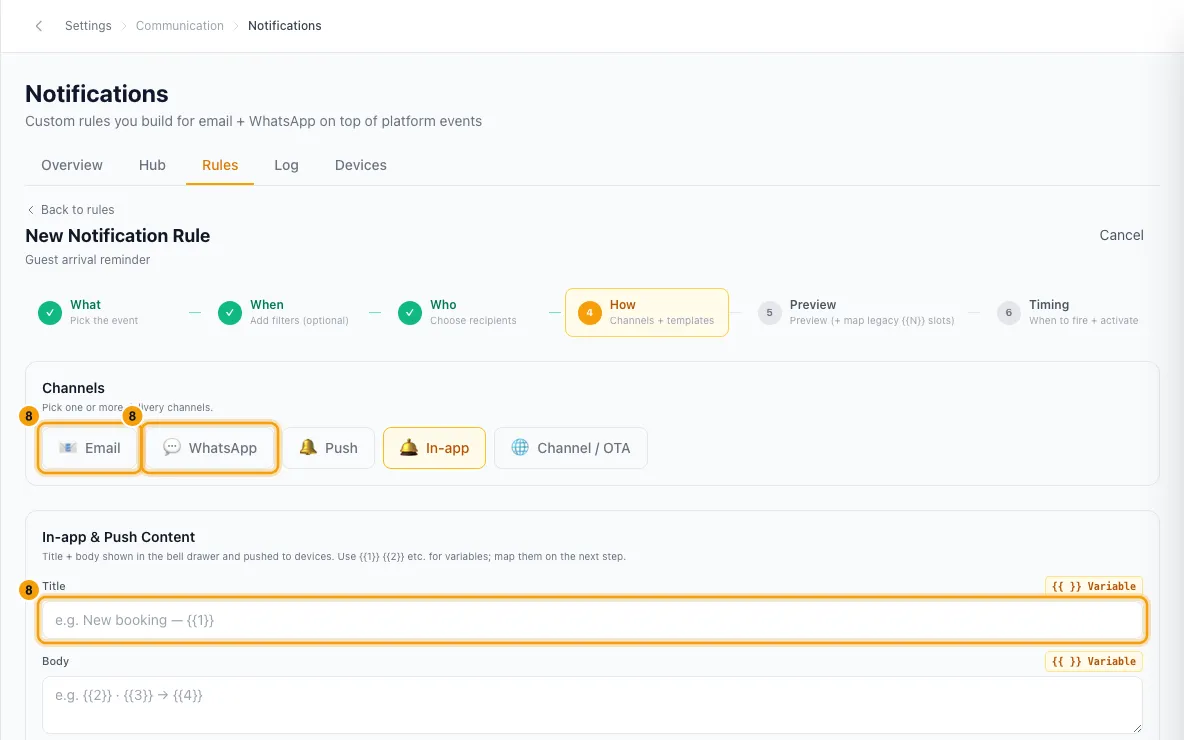
How: pick one or more channels: Email, WhatsApp, Push, In-app or Channel / OTA. Then pick the content for each:
- Email: click + Select email template.
- WhatsApp: click + Select WhatsApp template.
- Channel / OTA: click + Select channel template.
- Push and In-app: type the Title and Body.
Preview: if a template has numbered slots like {{1}}, match each one to a field. This step is skipped when there is nothing to match.
Timing: for an event rule, choose Immediately or After a delay (then Wait a number of minutes, hours or days). A date rule has no delay; its timing was set in step 4.
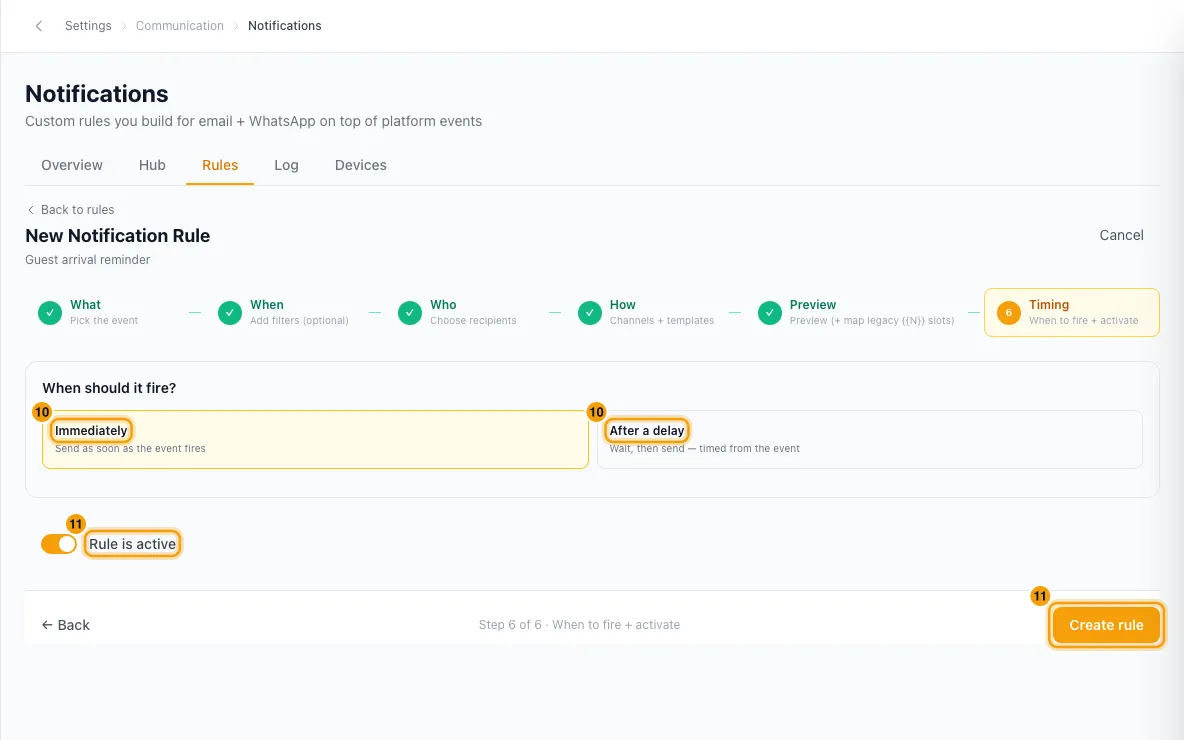
Leave the switch on (Rule is active), or turn it off to save the rule paused. Click Create rule.
Good to know
- Quotes are sent by the quote itself, no rule needed. Share Quote → Send via Email emails the guest the quote link (to the address in the Send via window), then marks the quote Sent. See "Send, hold, revoke or follow up a quote".
- A rule on the Quote sent event changes the wording, not whether it's sent. With a rule (Module Quotes, event Quote sent, recipient Quote Contact, timing Immediately), Send via Email uses that rule's email instead of the built-in one. Put the Quote Link (guest view) variable in it; without the link the send is refused.
- WhatsApp needs such a rule. Send via WhatsApp sends the rule's approved WhatsApp template, so the rule needs one, with Quote Link (guest view) mapped to one of its slots. Without it the quote is not sent and stays as it was.
- The guest gets one message. When you send from the quote, the rule doesn't message the guest again; anyone else on the rule (your team) is still notified. A rule set to After a delay (a reminder) still goes to the guest later.
- Mark Sent sends nothing itself, but it fires the same Quote sent event. With a rule on, the rule emails the guest then, at their main address.
- Guest emails you already have. Every account comes with these rules on the Rules tab, all on: Guest — booking confirmation, Guest — booking updated, Guest — booking cancelled, Guest — arrival details (the day before check-in), Guest — payment receipt, Guest — payment issue, Guest — payment due tomorrow, Guest — deposit released, Guest — deposit partially retained, Guest — refund issued and Guest — credit issued. Guest — deposit received is there but off. You can edit, pause or delete any of them.
- Who can get which channel: In-app and Push reach only team members who log in. Guests and owners get Email, WhatsApp or Channel / OTA. A new rule starts with In-app already picked; remove it for a guest-only rule.
- WhatsApp needs a template Meta has approved. Only approved templates appear in the picker. Channel / OTA posts in the booking's marketplace thread and needs a guest recipient.
- Changing a template keeps your matches. Click Change and pick the same template, and every slot on the Preview step stays as you set it. Pick a different template and your email matches stay as they were. For WhatsApp, a slot the new template still has keeps its field. The header keeps its value only if the new header is the same kind, and the link button keeps its value only if the new template has a link button too. Check the live preview before you save.
- Email templates live in Settings → Templates: see "Manage message templates (email, WhatsApp and channel)". If a rule's template is deleted or switched off, the rule shows ⚠ Email template missing or ⚠ Email template off and sends no email.
- Date rules use your company time zone. They go out within 15 minutes of the time you set, and each record gets the message once per date. If the date changes (for example, a guest moves their check-in), it is sent again for the new date. Keep the time of day at 23:30 or earlier.
- Personal tasks: a Tasks rule never sends a personal task to anyone except its creator and its assignee, whatever recipients the rule lists.
- Limits: up to 7 conditions and 5 recipient lines per rule. Up to 75 rules can be switched on at once; you see a warning from 50. Paused rules, the Hub's built-in alerts and the owner portal push defaults don't count.
- In the rules list, use the switch to pause or activate a rule. The icons are Edit rule, Duplicate rule (the copy starts paused), Send a test to myself, Delivery log, Edit history and Delete rule.
- Send a test to myself sends the email to your own address, with [TEST] before the subject, and the WhatsApp to your own phone. The real recipients get nothing. Push and in-app are not tested.
- A rule that fails 50 times in a row is switched off and marked Auto-disabled. See "Check whether a notification was sent (Notification Log)".
- Alerts your team gets for bookings, payments, quotes and more are built in. You set those on the Hub tab: see "Choose who gets the Hub's built-in alerts".
- You need the Settings permission to see or change rules.
Rentibly AI can help
- Describe the rule in a sentence, for example "email guests 3 days before check-in with the door code". It checks what you can build and what you already have, then builds the rule switched off.
- It can then switch it on, send you a test, change it, copy it, or switch a failing rule back on once it's fixed. Each change needs your confirmation.
- It can't delete rules or change the Hub's built-in alerts. You can also click Create with Rentibly AI on the Rules tab.
Still stuck?
Open Support from your profile menu in Rentibly, or email hello@rentibly.com — we answer fast.